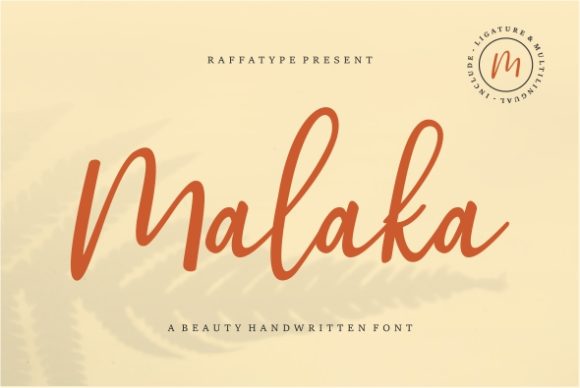
Malaka: A Handwritten Font for Modern Web Design
As a web designer, I'm always on the lookout for fonts that can add a touch of elegance and personality to my projects. Recently, I had the opportunity to test Malaka, a premium handwritten font, in a real website layout. The results were nothing short of impressive.
First Impressions with Malaka
When I first saw Malaka, I was struck by its graceful, calligraphic style. It has a unique blend of classic and contemporary elements, making it a versatile choice for a wide range of digital designs. For my initial test, I decided to use Malaka in the hero section of a boutique online store. The goal was to create an inviting and memorable first impression for visitors.
Visual Characteristics and Personality
Malaka's visual characteristics are both elegant and modern. Its flowing, hand-drawn lines give it a personal and approachable feel, while its clean and well-defined strokes maintain a sense of professionalism. This balance makes it perfect for brands that want to convey a high-end, yet welcoming image.
- Elegance: The calligraphic influences add a touch of sophistication.
- Contemporary: Despite its classic roots, Malaka feels fresh and modern.
- Versatility: Suitable for a variety of digital design needs.
Using Malaka in Website Headers and Hero Sections
In the hero section of the boutique online store, Malaka worked beautifully. The font's large, bold letters made the brand name stand out, creating a strong focal point. The fluid, handwritten style added a human touch, making the site feel more relatable and less corporate. This is especially important for a boutique brand that wants to connect with its audience on a personal level.
Readability and Visual Hierarchy
One of the key considerations for any font in web design is readability. Malaka performs exceptionally well in this regard, especially for larger text such as headings and titles. In the hero section, the text was easy to read, even when placed over a background image. The font's clear, well-spaced characters ensured that the message was easily legible, contributing to a positive user experience.
For smaller text or body copy, however, Malaka might not be the best choice. Its decorative nature can make it challenging to read in smaller sizes or in dense paragraphs. In these cases, it's better to pair Malaka with a clean, simple sans serif font for the body text.
Responsive Design and Mobile Readability
Responsive design is crucial in today’s mobile-first world. I tested Malaka on various devices, from desktops to smartphones, and it held up well. The font's smooth, flowing lines translated nicely to smaller screens, maintaining its elegance without sacrificing readability. However, for very small buttons or form labels, a more straightforward font would be more practical.
Font Pairing for Web Design
To create a balanced and cohesive design, I paired Malaka with a clean, modern sans serif font. This combination allowed me to use Malaka for the more decorative and attention-grabbing elements, such as the logo and main headings, while the sans serif provided a readable and professional look for the body text and other functional areas of the site.
- Primary Font (Malaka): Used for the logo, main headings, and key call-to-action areas.
- Secondary Font (Sans Serif): Used for body text, navigation, and other functional elements.
Real-World Examples and Applications
Besides the boutique online store, I also tested Malaka in other digital contexts. Here are a few examples:
- Creative Portfolio: Malaka added a personal and artistic touch to the portfolio site, making the artist's work feel more connected and authentic.
- Coaching Website: The font's warm and inviting style helped to build trust and a sense of approachability, which is essential for a coaching business.
- Product Landing Page: On a product landing page, Malaka's elegant and modern appearance enhanced the perceived value of the product, making it more appealing to potential customers.
Final Considerations and Best Practices
Before using Malaka in your web projects, there are a few things to keep in mind:
- Webfont Availability: Ensure that the font is available in webfont formats (e.g., WOFF, WOFF2) for optimal performance and compatibility.
- File Formats and Alternates: Check if the font includes multiple styles, weights, and alternates, which can be useful for adding variety and emphasis.
- Multilingual Support: If your project requires support for multiple languages, verify that Malaka includes the necessary character sets.
- Commercial Licensing: Always check the licensing terms to ensure that you have the right to use the font in commercial projects, especially if you're designing for clients or selling digital products.
In conclusion, Malaka is a fantastic choice for web designers looking to add a touch of elegance and personality to their projects. Its unique blend of classic and modern elements, combined with excellent readability and versatility, makes it a valuable addition to any digital design toolkit. Whether you're working on a boutique online store, a creative portfolio, or a coaching website, Malaka can help you create a memorable and engaging user experience.